
Job costing for contractors is the practice of assigning every dollar of labor, material, subcontract, equipment, and allocated overhead to the specific project that incurred it. It is the single fastest way to stop losing margin on mistakes you keep repeating without knowing it.
Start this week with three moves:
- Assign job IDs to every active project and require them on every receipt, timesheet, and purchase order.
- Start daily time capture — mobile or paper, but coded to the job and the cost category before the crew leaves the site.
- Create a PO/commit process so every subcontract and material order is logged the day it is signed, not the day the invoice arrives.
Job costing is not a software feature. It is an organizational discipline — and the contractors who enforce a weekly estimate-vs-actual review catch margin problems before they become losses.
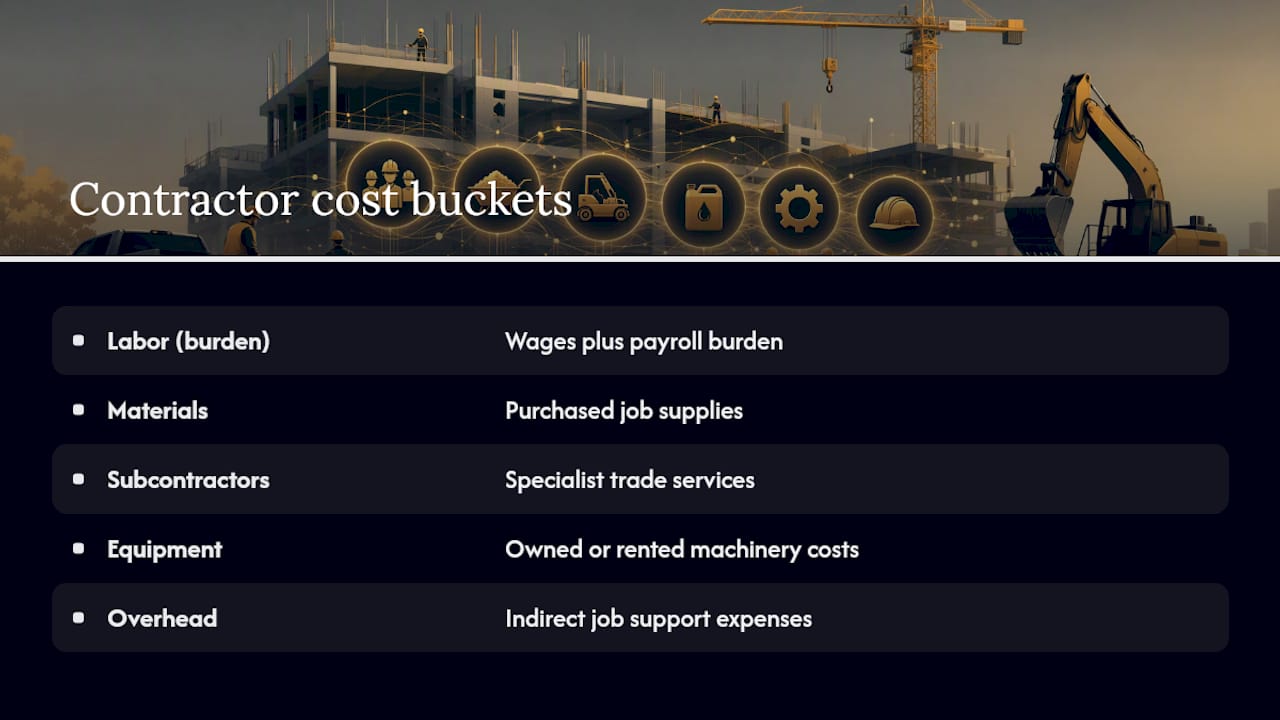
The five cost buckets every job must track are labor, materials, subcontractors, equipment, and overhead. Northstar Financial Advisory's construction guide makes the point plainly: missing even one of those five distorts your results. Industry standards like CSI MasterFormat give you the code structure to organize them. CFMA publishes equipment-rate guidance that keeps your owned-plant charges honest. And firms like Mbqs provide the commercial management support to make the whole system stick on real projects.
Pro Tip: Don't wait until your accounting system is perfect. A job ID on every receipt and a daily timesheet coded to a cost category will tell you more about your margins this month than any software demo.
Key Takeaways
Accurate job costing for contractors requires five tracked cost buckets, a weekly estimate-vs-actual discipline, and committed-cost recording from contract execution — not invoice date.
| Point | Details |
|---|---|
| Start with five cost buckets | Track labor (burdened), materials, subcontractors, equipment, and overhead on every job without exception. |
| Record committed costs immediately | Log subcontract and PO values on execution day — waiting for invoices leaves your job ledger wrong for weeks. |
| Run weekly estimate-vs-actual | Flag variances above 5% or $5,000 and require a written PM explanation before the next billing cycle. |
| Update EAC every week | A forecast that never changes is not a forecast; EAC inputs from PMs drive WIP accuracy and surety credibility. |
| Enforce job IDs in the field | Every timesheet, receipt, and PO must carry a job ID — missing codes are the primary cause of job-cost data failure. |
Table of Contents
- What job costing actually is for contractors
- Why accurate job costing changes your business
- The five cost buckets every contractor must track
- How to structure cost codes and build a weekly rhythm
- Managing subcontractor costs, committed costs, and change orders
- The essential job-cost reports every contractor needs
- What job costing software should actually do
- How to pick the right job-costing system for your company
- Implementation checklist and a worked EAC example
- Training field and office staff on accurate data entry
- Legal and compliance considerations that affect job costing
- The gap between what job costing promises and what most contractors actually do
- Sources
What job costing actually is for contractors
Job costing tracks costs at the individual project level, giving you a project-level profit and loss statement for every job you run. That is fundamentally different from how most small contractors operate, where all revenue and costs flow into a single company P&L that blends every job together.
Process costing, used in manufacturing, averages costs across a production run. Standard costing sets predetermined rates and measures variance against them. Neither fits construction, where every project has a unique scope, duration, crew mix, and subcontract structure. Deltek's contractor guide explains the core reason: construction job costing must map cost codes to the general ledger so that project-level data and company-level financials stay consistent and auditable.
Three outcomes job costing delivers directly:
- Accurate bids. When you know what Division 03 concrete work actually cost on your last three jobs, your next concrete estimate is grounded in reality, not gut feel.
- Early overrun detection. A weekly estimate-vs-actual run flags a labor overrun in week three, not week twelve when the damage is done.
- Reliable WIP for surety and banks. Bonding capacity and credit lines depend on a credible work-in-progress schedule, and that schedule is only as good as your job-cost data.
Why accurate job costing changes your business
Picture two jobs running simultaneously. Job A comes in $40,000 over budget. Job B finishes $40,000 under. Under a blended company P&L, they cancel out and your accountant tells you it was a decent quarter. You never find out that your concrete crew is bleeding money on every commercial slab, or that your framing crew is your most profitable division. You keep bidding concrete at the same rate. The losses compound.
That is the core problem a proper job-cost system solves. The financial consequences of running without one are specific:
- Underbidding on cost categories where you consistently overrun, because your estimates are built on blended averages.
- Cash-flow surprises when a subcontractor invoice arrives for a committed cost you never recorded.
- Bonding risk when your WIP schedule shows overbilled positions your surety cannot reconcile.
- False profitability at the company level that masks individual job losses until it is too late to recover.
A contractor running ten jobs without job-level tracking is flying ten planes with one altimeter — the average reading tells you nothing about which one is in trouble.
Sureties and banks review WIP schedules quarterly. A WIP schedule built on accurate job-cost data shows percent complete, earned revenue, and over/underbilled positions. One built on guesswork gets flagged immediately.
The five cost buckets every contractor must track
Labor (with burden)
Labor is usually the hardest bucket to capture accurately, and the most consequential when it goes wrong. The base wage is only part of the cost. Labor burden — payroll taxes, workers' compensation, health insurance, retirement contributions — typically adds a significant percentage on top of base wages, depending on trade and state. A framer earning $32/hour may cost you $42–$45 fully burdened.

The failure point here is uncoded time. A crew member who splits a day between two jobs and logs all hours to one is silently shifting cost. Mobile time capture with a required job ID field closes that gap.
Pro Tip: Calculate your burdened labor rate before you build a single estimate. Divide total annual labor cost (wages plus all burden) by productive hours worked — not calendar hours. The difference between 2,080 calendar hours and 1,650 productive hours after vacation, holidays, and downtime can move your true rate by $8–$12 per hour.
Materials (POs and delivery tickets)
Materials purchased on a credit account or delivered to the wrong site are a classic source of cost migration between jobs. The control points are the purchase order and the delivery ticket. IECI's construction job costing guide identifies PO-to-delivery-ticket reconciliation as the primary defense against materials diversion.

Common failure points: supply runs made without a PO, deliveries signed off without a job code, and materials ordered for Job A that end up installed on Job B.
Pro Tip: Require a job ID on every supplier PO at the point of purchase, and reconcile delivery tickets to POs weekly before approving any supplier invoice for payment.
Subcontractors (committed costs)
For many general contractors, subcontractor costs represent the largest portion of total project cost, as noted in Northstar's construction guide. Recording that cost only when the invoice arrives means your job ledger is wrong for weeks or months at a time.
The fix: record the full subcontract value as a committed cost the day the contract is executed. Every approved change order updates that committed amount immediately.
Equipment (owned vs. rented)
Rented equipment is straightforward — the invoice tells you the cost. Owned equipment is where contractors routinely undercharge their jobs. A company-owned excavator sitting on your job for three weeks has real costs: depreciation, maintenance, insurance, and opportunity cost. CFMA publishes equipment cost guidelines that many contractors use as the basis for internal charge rates.
Failure point: owned equipment used on a job with no internal charge, making the job look cheaper than it is and subsidizing it from company overhead.
Overhead (job-level vs. company-level)
Job-level overhead includes items directly tied to the project: site supervision, temporary facilities, site insurance, and project-specific preliminaries. Company-level overhead — office rent, accounting, marketing — needs to be allocated across jobs using a consistent method, typically a percentage of direct costs or an activity-based rate.
The failure point is inconsistency: allocating overhead to some jobs and not others, or changing the method mid-year, which makes job comparisons meaningless.
How to structure cost codes and build a weekly rhythm
CSI MasterFormat and your starter template
CSI MasterFormat is the industry standard for organizing construction work into divisions. Division 03 covers concrete, Division 09 covers finishes, and so on across 50 divisions. Most contractors do not need all 50. A pragmatic 20–40 code starter template covers the work categories that actually appear on your jobs and maps cleanly to your chart of accounts.
Start small. Accurately tracking a few cost buckets beats a large, poorly tracked code system. Expand your code list only after the basics run clean.
Mapping cost codes to your chart of accounts
Every cost code needs a corresponding general ledger account so that job-cost reports and financial statements stay in sync. Deltek's guide emphasizes that consistent cost-code-to-GL mapping is what makes reporting reliable across projects. A practical mapping example:
| Cost Code | Description | GL Account |
|---|---|---|
| — | Job labor | COGS — Direct Labor |
| — | Job materials | COGS — Materials |
| — | Subcontractors | COGS — Subcontracts |
| — | Equipment (owned) | COGS — Equipment |
| — | Job overhead | COGS — Job Overhead |
Daily field processes
The data quality of your job-cost system is determined in the field, not the office. Three non-negotiable daily habits:
- Every receipt gets a job ID written on it before it leaves the site.
- Time is captured on a mobile app or paper timesheet, coded to the job and cost category, before the crew leaves.
- Every supplier PO is coded at the point of purchase, not retrospectively.
Weekly office review checklist
The weekly review is where job costing becomes a management tool rather than a bookkeeping exercise.
- Run estimate-vs-actual for every active job.
- Flag any cost category where actual exceeds budget by more than 5% or $5,000, whichever is less.
- Collect updated EAC inputs from project managers.
- Capture all approved change orders and update committed costs.
- Reconcile any unmatched delivery tickets or POs.
- Update the WIP schedule with current cost-to-date and percent complete.
Pro Tip: Assign the weekly review to a named person — a project accountant, office manager, or senior PM. When nobody owns it, it doesn't happen.
Managing subcontractor costs, committed costs, and change orders
Record committed costs on contract execution
The moment a subcontract is signed, that dollar amount belongs on your job ledger as a committed cost. Waiting for the invoice means your cost-to-date report understates your exposure for weeks. On a $2M job with $1.2M in subcontracts, that gap is not a rounding error.
What to track per subcontract
For each subcontract, maintain a running record of:
- Original contract amount
- Approved change orders (cumulative)
- Revised contract value
- Amount invoiced to date
- Amount paid to date
- Retainage held
Reconciliation steps
- Compare committed subcontract amounts to accounts payable weekly.
- Confirm every approved CO has been added to both the subcontract record and the job budget.
- Verify retainage calculations match the contract terms before releasing any payment.
- Check certificates of insurance before processing any subcontractor payment — an expired COI is a liability exposure, not just an administrative gap.
Common mistakes to avoid
- Missing COs that were verbally approved but never documented, leaving your committed cost understated.
- Late CO approvals that allow a subcontractor to invoice above the original contract value before the CO is processed.
- Retainage released early because the job-cost system did not flag the holdback balance.
The essential job-cost reports every contractor needs
Cost-to-date and committed cost columns
The cost-to-date report shows what has been spent against each cost code. The committed cost column adds POs and subcontracts that have been executed but not yet invoiced. Together, they give you total exposure — not just what has hit accounts payable.
Estimate at completion (EAC)
EAC is your best current forecast of what the job will cost when finished. The standard formula:
EAC = Cost to Date + Estimated Cost to Complete
If a framing package was budgeted at $180,000, you have spent $120,000, and your PM estimates $75,000 remaining, your EAC is $195,000. That is a $15,000 overrun you can act on now, not after the job closes.
Update EAC inputs from project managers every week. An EAC that never changes is not a forecast — it is a fiction.
Variance report thresholds
Require a written explanation from the responsible PM. That explanation either surfaces a real problem or confirms the variance is a timing issue. Either way, you know.
WIP schedule and why banks care
Autodesk's construction blog explains the direct link: WIP schedules pull cost-to-date and EAC from your job-cost system to calculate percent complete using the cost-to-cost method, then compare earned revenue to billed amounts to identify overbilled and underbilled positions. Sureties and banks review this quarterly. A WIP schedule with credible numbers behind it is a competitive advantage at bonding renewal time.
Core report columns at a glance
| Column | What it shows |
|---|---|
| Original budget | Contracted scope at bid |
| Revised budget | Budget after approved change orders |
| Cost to date | Actual costs posted to date |
| Committed costs | Executed POs and subcontracts not yet invoiced |
| EAC | Forecast total cost at completion |
| Variance | Revised budget minus EAC (positive = under budget) |
What job costing software should actually do
Feature checklist
Procore's platform documentation outlines the capabilities modern job-cost software must deliver. Before committing to any system, confirm it handles:
- Mobile time capture with job ID and cost-code fields required at entry
- PO and committed-cost ledger that updates the job record on execution, not invoice
- EAC forecasting with PM input fields
- Equipment internal rate tables for owned plant
- Change-order workflow with budget impact visible before approval
- GL/ERP sync that maps cost codes to your chart of accounts automatically
- WIP report generation from live job-cost data
Integration notes
The accounting integration is where most implementations fail. Your job-cost system must map cost codes to GL accounts without manual re-entry. If you are running QuickBooks Online, confirm the integration writes directly to COGS accounts by cost category. Enterprise contractors using an ERP need bidirectional sync so that AP invoices coded in the ERP update job-cost records in real time.
Vendor examples in the market
Several platforms are commonly seen across U.S. construction firms. Deltek offers purpose-built construction ERP with deep job-costing and WIP reporting. Procore combines field management with financial tracking and integrates with accounting systems. Autodesk Construction Cloud connects scheduling, cost management, and forecasting in one environment. Miter is a newer entrant focused on field-first time capture and payroll integration for trade contractors. Each serves a different company size and workflow profile — there is no universal answer.
Pro Tip: Ask every vendor the same three questions during a demo: How does your system handle committed costs versus invoiced costs? How does labor burden get applied — at time entry or in payroll? And what does the WIP report look like out of the box? The answers tell you more than any feature list.
Data migration checklist
When moving to a new system, the most common pitfalls are:
- Historical cost codes that do not map cleanly to the new code structure — resolve this before go-live, not after.
- Open retainage balances that need to be entered as committed costs in the new system.
- Partially completed jobs where cost-to-date must be entered manually to establish a correct opening balance.
- Subcontract records with approved COs that were never formally documented — surface and resolve these before migration.
How to pick the right job-costing system for your company
Buying checklist
Before you shortlist vendors, answer these questions about your own operation:
- How many active jobs do you run simultaneously?
- Do your field crews have smartphones, and will they actually use a mobile app?
- What accounting system are you running, and does it have a published API?
- Do you need multi-company or multi-division reporting?
- What is your realistic implementation budget, including training time?
Questions to ask during vendor demos
- How does your system distinguish between committed costs and invoiced costs in the job ledger?
- How is labor burden applied — at time entry, in payroll processing, or as a manual allocation?
- What APIs or native integrations exist with QuickBooks Online, Sage, or your ERP?
- How does the system handle retainage on both subcontract payables and owner receivables?
- What does the WIP schedule look like, and can it be exported in the format our surety requires?
- What does onboarding and ongoing support look like for a company our size?
Pilot plan
Scope a 30–90 day pilot on two or three active jobs before full rollout. Assign an internal owner — typically the controller or a senior PM — who is accountable for the pilot results.
Implementation checklist and a worked EAC example
30/60/90-day plan
Days 1–30 (Foundation)
- Define your job ID structure and assign IDs to all active projects.
- Build your starter cost-code template (20–40 codes mapped to GL accounts).
- Configure your job-cost system or set up a structured spreadsheet as an interim tool.
- Train field supervisors on daily time capture and job-coded PO requirements.
- Establish the weekly review meeting with a named owner.
Days 31–60 (Discipline)
- Run estimate-vs-actual for every active job and document the first variance findings.
- Audit timesheet submission rates and address gaps with field supervisors directly.
- Reconcile all open subcontract records — confirm committed costs match executed contracts.
- Set internal equipment charge rates using CFMA guidance as a benchmark.
- Produce your first WIP schedule from live job-cost data.
Days 61–90 (Refinement)
- Review cost-code coverage — are any costs still hitting unallocated or miscellaneous codes?
- Collect PM feedback on EAC inputs and adjust the update process where it is breaking down.
- Compare your first three closed jobs under the new system to prior estimates and identify the biggest estimating gaps.
- Document lessons learned and update your estimating templates accordingly.
Worked EAC example
A commercial fit-out job has a revised budget of $420,000 after one approved change order.
At week 8, this job is tracking $67,000 under budget.
Pro Tip: Download a starter cost-code template and a weekly review checklist from Mbqs to shortcut the setup phase. Mbqs also provides implementation support for contractors who need help mapping cost codes, configuring WIP schedules, or managing the commercial side of a difficult job.
Training field and office staff on accurate data entry
The most common reason job-cost systems fail is not the software. It is that field staff do not understand why the data matters, and office staff do not follow up when it is missing.
Field training needs to be concrete and brief. Show a laborer or foreman exactly what happens when time is logged to the wrong job: the estimate-vs-actual report shows a false overrun on one job and a false surplus on another, the PM makes a wrong decision, and the company loses money it did not have to lose. That explanation, delivered in five minutes on site, lands better than any training manual.
For office staff, the discipline is follow-up. When a timesheet arrives without a job code, it goes back to the field supervisor before it is processed — not after. When a supplier invoice arrives without a matching PO, payment is held until the PO is created and coded. These are not bureaucratic hurdles; they are the controls that keep your job-cost data usable.
A few practices that work in the field:
- Post a laminated job-ID and cost-code reference card in every site office and on every company vehicle.
- Make job-code entry a required field in your time-capture app — the system should not accept a submission without it.
- Review timesheet coding accuracy weekly, not monthly, and give supervisors direct feedback when their crew's submissions are consistently miscoded.
On the office side, assign a single person to own data quality for each active job. That person runs the weekly estimate-vs-actual, flags variances, and chases missing data before the weekly review meeting. When ownership is shared, it defaults to nobody.
Legal and compliance considerations that affect job costing
Lien laws and payment documentation
U.S. lien laws vary by state, but the underlying principle is consistent: a contractor or supplier who has not been paid can file a lien against the property. Accurate job costing directly supports your lien rights because it gives you a documented, cost-coded record of every dollar spent on a specific project. When a payment dispute arises, your job-cost report is evidence.
Preliminary notices — required in many states before a lien can be filed — must typically be sent within a defined window after first furnishing labor or materials. Missing that window can extinguish your lien rights entirely. Your job-cost system should record the date of first furnishing for every project so that preliminary notice deadlines are never missed.
Bonding requirements and WIP accuracy
Surety bonds require contractors to demonstrate financial capacity and project management competence. Sureties review WIP schedules, and a WIP schedule built on inaccurate job-cost data creates two problems: it may misstate your bonding capacity, and it signals to the surety that your financial controls are weak. Either outcome affects your bonding limits.
The CFMA's financial reporting guidelines are a recognized standard for construction company financials. Contractors who align their job-cost reporting with CFMA standards present more credible financials to sureties and lenders.
Change orders and claims documentation
Unpriced or disputed change orders are one of the most common sources of construction claims. Your job-cost system needs to capture costs associated with potential claims separately from the base contract, using dedicated cost codes. That separation makes it possible to quantify a claim accurately when the time comes.
If a dispute escalates, your job-cost records — timesheets, POs, delivery tickets, subcontract records, and CO logs — are the foundation of any claim or defense. Mbqs provides claims and dispute support for contractors who need help quantifying and presenting cost-based claims, drawing directly on the job-cost data the contractor has already assembled.
Certified payroll and prevailing wage compliance
On federally funded or Davis-Bacon projects, certified payroll reporting is a legal requirement. Your job-cost system must be able to produce payroll records by job, by trade classification, and by week. If your time-capture system does not support trade classification at the point of entry, you will be reconstructing payroll records manually — which is both time-consuming and error-prone.
The gap between what job costing promises and what most contractors actually do
Most contractors understand the concept of job costing. Far fewer run a system that actually delivers on it. The gap is almost never the software. It is the weekly discipline.
The contractors who hit their numbers consistently share one habit: they treat the weekly estimate-vs-actual review as non-negotiable, the same way they treat a safety meeting or a progress billing deadline. The review takes 45 minutes. It surfaces problems while there is still time to act. And over two or three years, it builds an estimating database that makes every future bid more accurate than the last.
What most contractors do instead is run the report at job close, confirm the overrun they already suspected, and move on. That is bookkeeping, not cost management. The data is the same; the timing is what changes the outcome.
There is also a tendency to over-engineer the system before the basics are working. A 40-code structure with five cost categories tracked inconsistently is worse than a 15-code structure where every dollar is coded correctly. Start with what your field team will actually use. The sophistication can come later, once the discipline is established.
Mbqs works with contractors at exactly this point — not just setting up the system, but building the commercial management discipline around it: weekly reviews, EAC updates, WIP schedules, and the contract administration that keeps change orders and subcontract records current. For contractors who want to convert that improved profitability into business growth, SearchRankPro™ provides targeted digital marketing and lead generation built specifically for the construction industry.

Sources
- Cfma
- Job Costing: A Guide for Contractors and Construction Firms | Deltek
- Procore
- Construction Job Costing: The Complete Guide for Contractors | Northstar Financial Advisory
- Job Costing in Construction: A Complete Guide for Contractors - Digital Builder